KnotWasted
Online cut list optimizer

Cut list optimizer for plywood and sheet goods

Enter your parts and KnotWasted lays them out on the sheet so you buy fewer panels. You get the cutting diagram, the order of the cuts and the parts list.

Try it freeNothing to install · works on phone and desktop
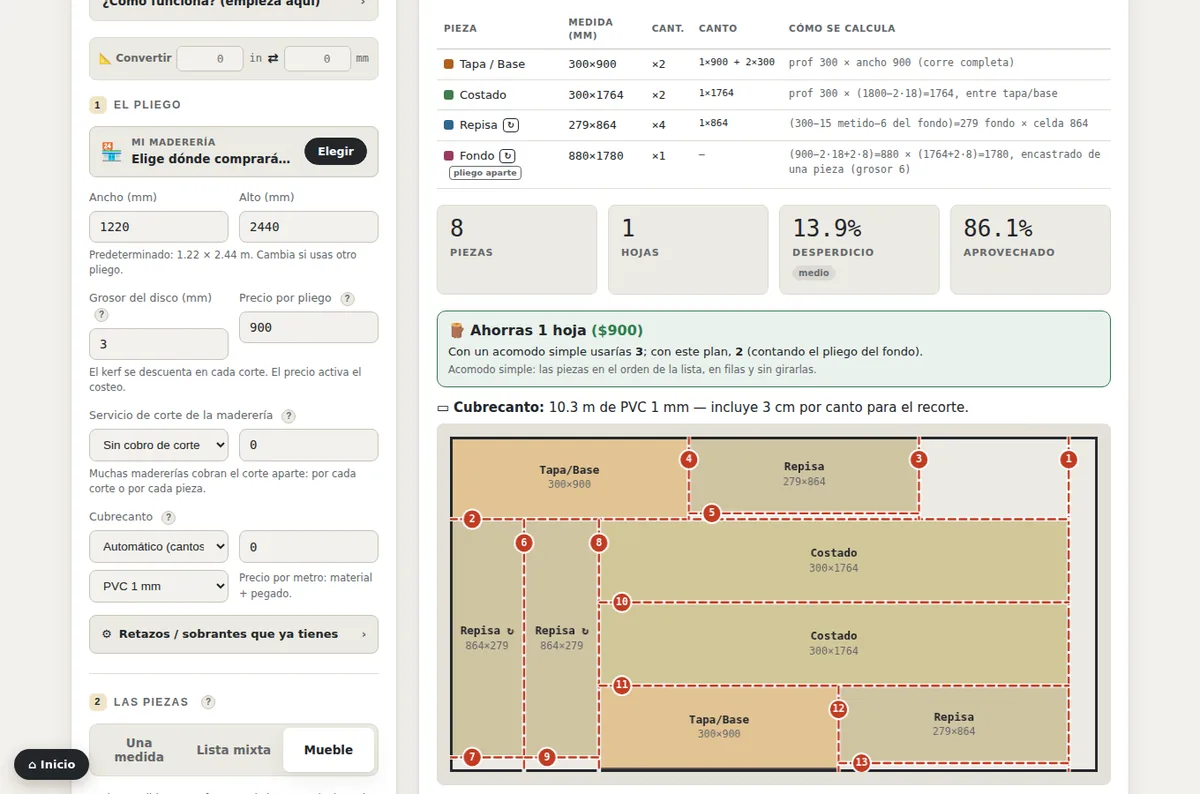
Cutting diagram for a bookcase: parts laid out on a sheet with the cut order numbered

How it works

Three steps, no CAD skills needed.

1

Set your sheet

Enter your sheet size and the saw blade thickness, so every cut's kerf is accounted for.

2

Enter your parts

One repeated size, a mixed list, or build the whole cabinet and let the app work out sides, shelves, doors, drawers and back.

3

Get the cutting diagram

Each sheet with its parts, cuts numbered in a sensible order, and the yield. Download it as a PDF.

Built for the shop

Frequently asked questions

Is the cut list optimizer free?

Yes. The free plan includes the optimizer, a basic cabinet, the cutting diagram and the cut order.

Does it account for the saw kerf?

Yes. You enter the blade thickness and it is subtracted on every cut.

Does it respect grain direction?

Yes. You can allow or forbid rotation for sides, shelves, tops, dividers and backs.

Can I use it on my phone?

Yes. It runs in the browser on a phone or a computer, with nothing to install.

Stop cutting by eye

Measure twice, cut once. Try the optimizer on your next project.

Open the optimizer